Search by patient or record
Use a name, record ID or encounter ID. Narrow results by archive, birth date, document type and date range. Copy a search link or browse an archive by date.
 ATLAS ARCHIVE
HEALTHCARE RECORDS AFTER SYSTEM RETIREMENT
ATLAS gives your team one place to search, view and retrieve records from legacy applications. Keep your storage, decide who can access each archive and review how records are used.
ATLAS
Archiving and Tracking of Legacy Application Systems
THE PLATFORM
Your archives can use different databases and storage locations. ATLAS searches the permitted sources together and keeps each document linked to its archive.
Use a name, record ID or encounter ID. Narrow results by archive, birth date, document type and date range. Copy a search link or browse an archive by date.
View documents in an embedded viewer, download originals or prepare a combined print PDF. ZIP packages can include selected files or every matching result, within configured limits.
Review recorded searches, views, downloads and exports. Follow a record’s history, filter by account and date, or prepare a patient audit report.
INSIDE ATLAS
These browser captures come from the development application. The records are synthetic. ATLAS branding and demo account labels have been applied for presentation.
Find a patient’s documents across permitted sources, then filter, view, print or export the results.
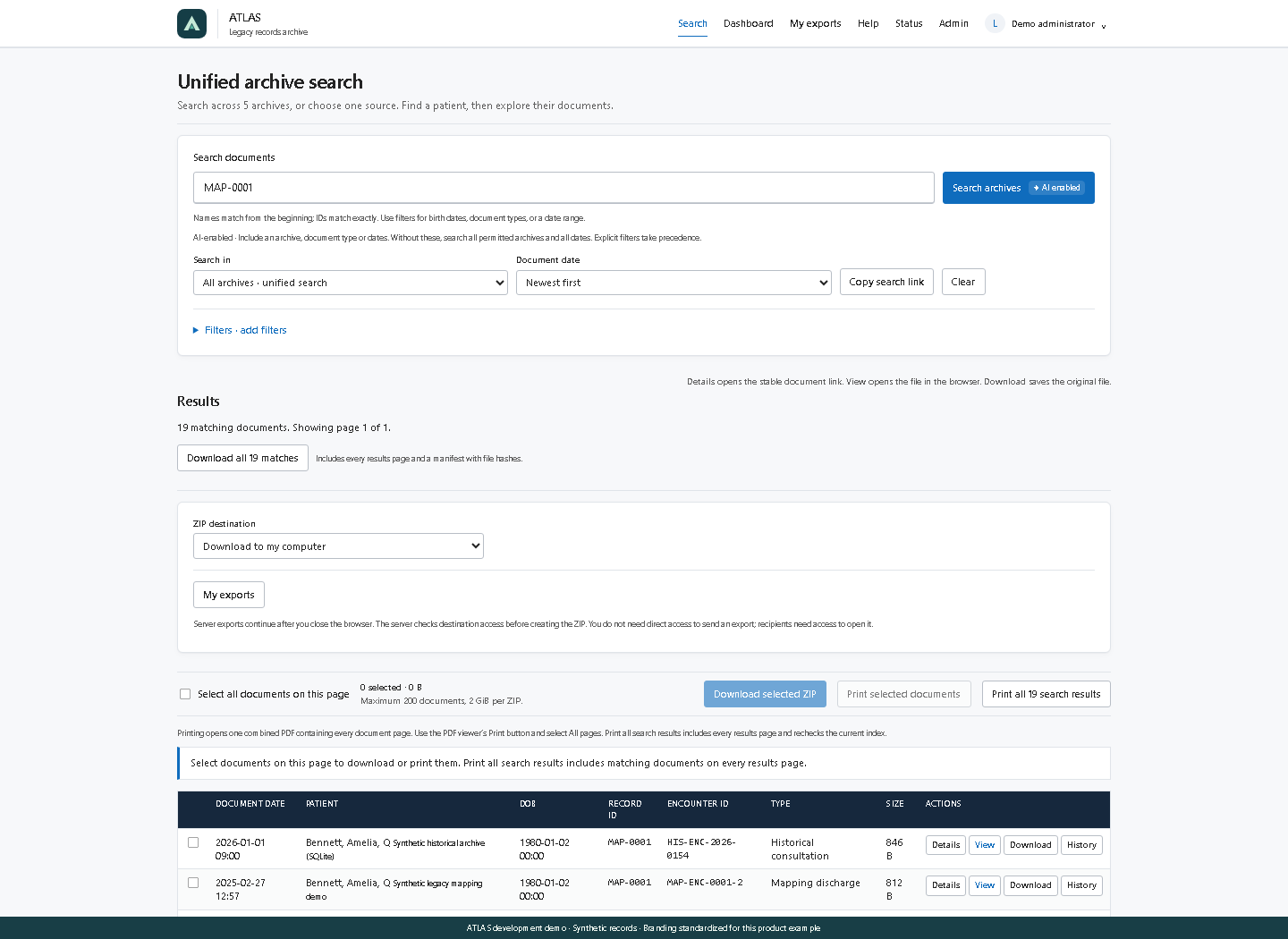
Screenshots illustrate the product interface. They are not an interactive medical-record system and contain no customer records.
FOR RECORDS TEAMS AND IT
ATLAS includes tools for delivery, permissions and operations, alongside the record search experience.
Send a ZIP to an approved Azure Blob or Windows share destination. Server jobs continue after the browser closes, with progress and outcomes in My exports.
Dashboard cards show indexed records, searchable documents and date coverage. Select a year, month or day on a chart to search that period.
Use built-in or custom roles. Assign directory groups or individual users, then control actions and archive access separately. The server enforces both.
The optional historical audit module preserves source log files and indexes explicitly mapped events. It keeps imported history separate from current ATLAS activity.
Connect SQLite, SQL Server, Azure SQL or an approved lake SQL view. Map source columns to archive fields and validate the mapping before enabling search.
Check document availability, database connections and index coverage. Review server status, application logs and configuration changes across configured nodes.
OPTIONAL LOCAL AI SEARCH
ATLAS includes an optional model that runs on your server. It helps interpret a search request before the application runs its indexed search. Your team can review the filters and change them.
The model does not read medical documents or produce clinical summaries. Ordinary search remains available when AI is disabled or busy.
How local AI search works ↗“Documents for Jane Doe
from 2012 to 2014”
Runs on the application server. No external AI API is required. This is an example of request interpretation, not a clinical answer.
IN THE CLINICAL WORKFLOW
The implemented SMART on FHIR connector can launch a patient’s mapped archive records from Epic. Optional Epic OpenID sign-in, approved user roles and explicit patient identifier mappings control the workflow.
Each customer’s Epic registration, endpoints, patient mappings and browser workflow require validation. Epic ingestion, document write-back and embedded Hyperdrive workflows are separate future work.
Explore the connector ↗WHERE ATLAS RUNS
Self-hosted software and customer-owned Azure storage are part of the platform. Talk with us about managed SaaS availability and the responsibilities for your deployment.
For organizations that want ATLAS to operate the application.
Use storage and databases in your organization’s Azure environment.
Install ATLAS on infrastructure your organization manages.
Confirm operating systems, network access, storage regions, capacity, licensing and support during deployment planning.
THE COST OF KEEPING OLD SYSTEMS
A retired application can still carry license renewals, servers, backups and patching work. An archive can help remove that dependency when the required records and access workflows have been validated.
We start with your application inventory, record requirements and retrieval needs. Together, we can compare the cost of retaining a legacy system with the cost of an archive. Savings depend on the systems, contracts and scope.
Discuss a retirement plan ↗PRODUCT ROADMAP
Current features provide search, retrieval and access history. The roadmap extends that work to ongoing ingestion and analysis of archived billing data.
Discuss the roadmap ↗Planned ingestion workflows for keeping an archive current while a source application approaches retirement.
Planned analysis of historical billing records for potential missed charges and recovery opportunities, with source evidence and human review. No recovery outcome is guaranteed.
Future ingestion and document write-back connectors will need source specifications, permissions and customer testing.
SECURITY AND PROCUREMENT
ATLAS has application controls your team can evaluate. Deployment security, retention policy, recovery testing and contractual requirements still need review in your environment.
Discuss security requirements ↗No completed SOC 2 examination or report is claimed. Ask for the current readiness status during procurement.
Enterprise sign-in, feature and archive permissions, read-only source connections and server-side document boundary checks are implemented.
Record access history includes actions, outcomes and an integrity chain. Historical source logs are preserved separately. Retention and independent checkpoints remain deployment responsibilities.
Confirm BAA requirements, hosting regions and privacy obligations before processing protected health information. No HIPAA or HITRUST certification is claimed.
COMMON QUESTIONS
The platform implements unified archive search, document viewing, downloads, printing, server exports, dashboards, role permissions and access history. Optional modules include local AI search, historical audit import and an Epic SMART chart-launch connector. Confirm the release, configuration and acceptance criteria for your project.
Yes. ATLAS supports customer-owned Azure Blob document storage and Azure SQL indexes, alongside local files, Windows shares and other supported database sources. Access, identity and network requirements are reviewed during setup.
The optional local model interprets search requests. It does not read medical documents, produce clinical summaries or generate database queries. Search permissions and archive restrictions still apply. AI-assisted billing recovery is a separate roadmap item.
The SMART on FHIR chart-launch connector is implemented, with optional Epic OpenID sign-in. Your Epic team must register the application, approve identifiers and mappings, and validate the workflow against your own endpoints. This site does not claim Epic certification.
No completed report is claimed. SOC 2 work is pending. We can discuss the current controls, readiness status and documents your procurement team requires.
Licensing is based on patient capacity rather than document count or web-server count. Fees, deployment scope, support and service levels are agreed in a customer order. Ask us to review the counting methodology for your archives.
PLAN YOUR ARCHIVE